Making better choices with Yuka

It’s been a while (4 years!) since my last post so that means a few things had to have happened for this to manifest. First, I’m on winter break hanging out with my family and have some more free time. Second, I started working on a personal portfolio and noticed I hadn’t posted anything since 2021. Third, and most important, I’m inspired by a new app I’ve been using – Yuka!

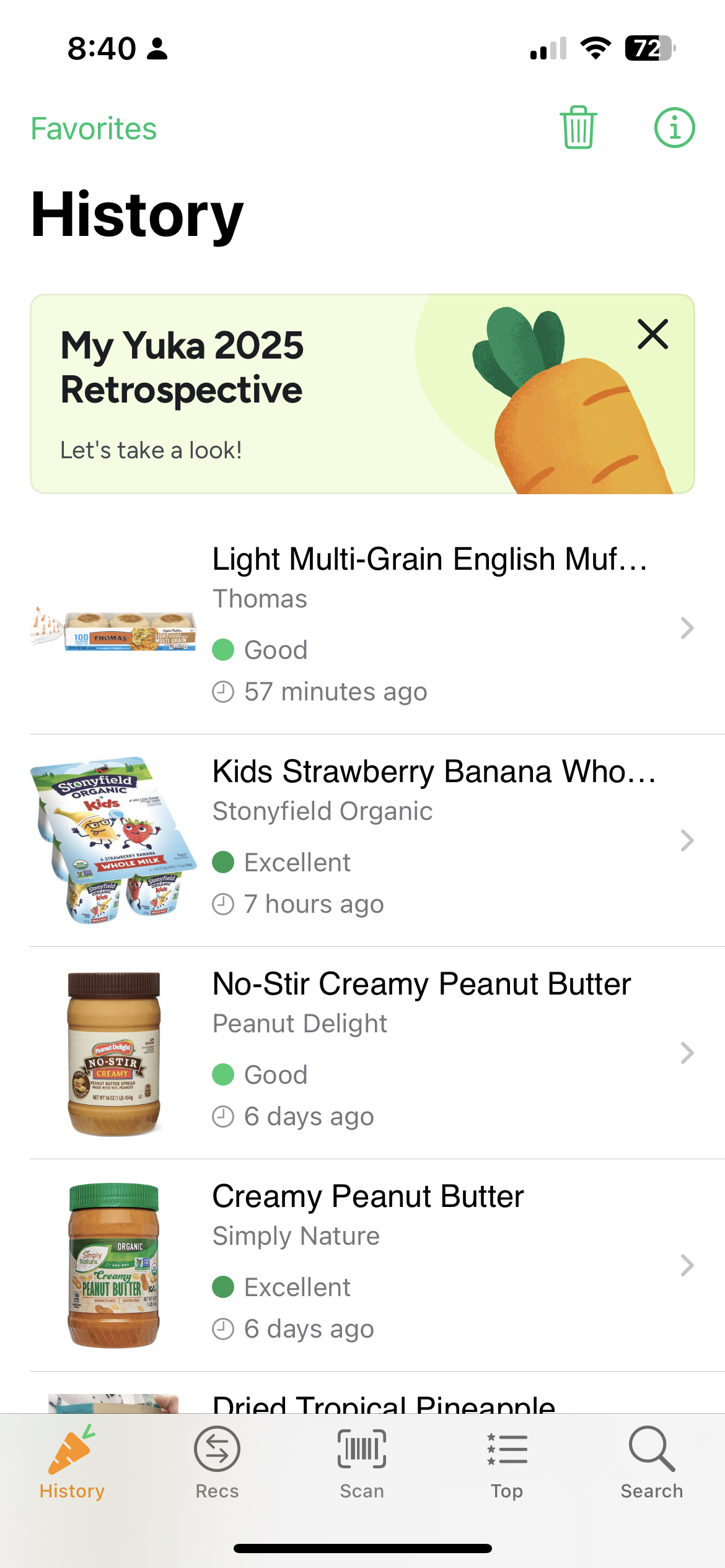
I kept seeing people on TikTok sharing images from an app that rated foods and I was intrigued. I mentioned it to my wife and she told me it was Yuka. I downloaded immediately and have been hooked ever since. It even occupies a coveted spot on the first screen of my iPhone!

How It Works

Yuka rates food products based on three factors:

1. Nutritional value (60% of the score)

2. Additives (30% of the score)

3. Organic nature (10% of the score)

You scan a barcode and get a score from 0-100, color-coded from red (poor) to green (excellent). Pretty simple.

The app is free to use, but you can upgrade to premium for features like searching items (instead of scanning), offline mode, and adding dietary preferences. Feature request – option to categorize food so you can search your history more efficiently! You choose what you pay for the premium version, which is kinda wild. The default is set to $15/year – I chose to pay $20.

Why I Think It Works

The app is great because it solves a problem – collecting and analyzing health information about your groceries. But how it solves this is what makes it really stand out for me.

Immediate value. I love the instant gratification of it tbh. You scan, you get a score, you get a dopamine hit. There’s no waiting, no logging meals, no entering data. Just scan and know. In a grocery store aisle, that immediacy is everything. You’re already making dozens of micro-decisions about what to buy – Yuka just makes one of them feel easier and more rewarding.

Motivation to do better. I feel like I’m pretty good about reading ingredient labels and trying to avoid products with too many weird things, but you inevitably miss stuff. And my vision isn’t what it once was so squinting at ingredients in 8-point font isn’t really an option for me. And that’s where Yuka comes in.

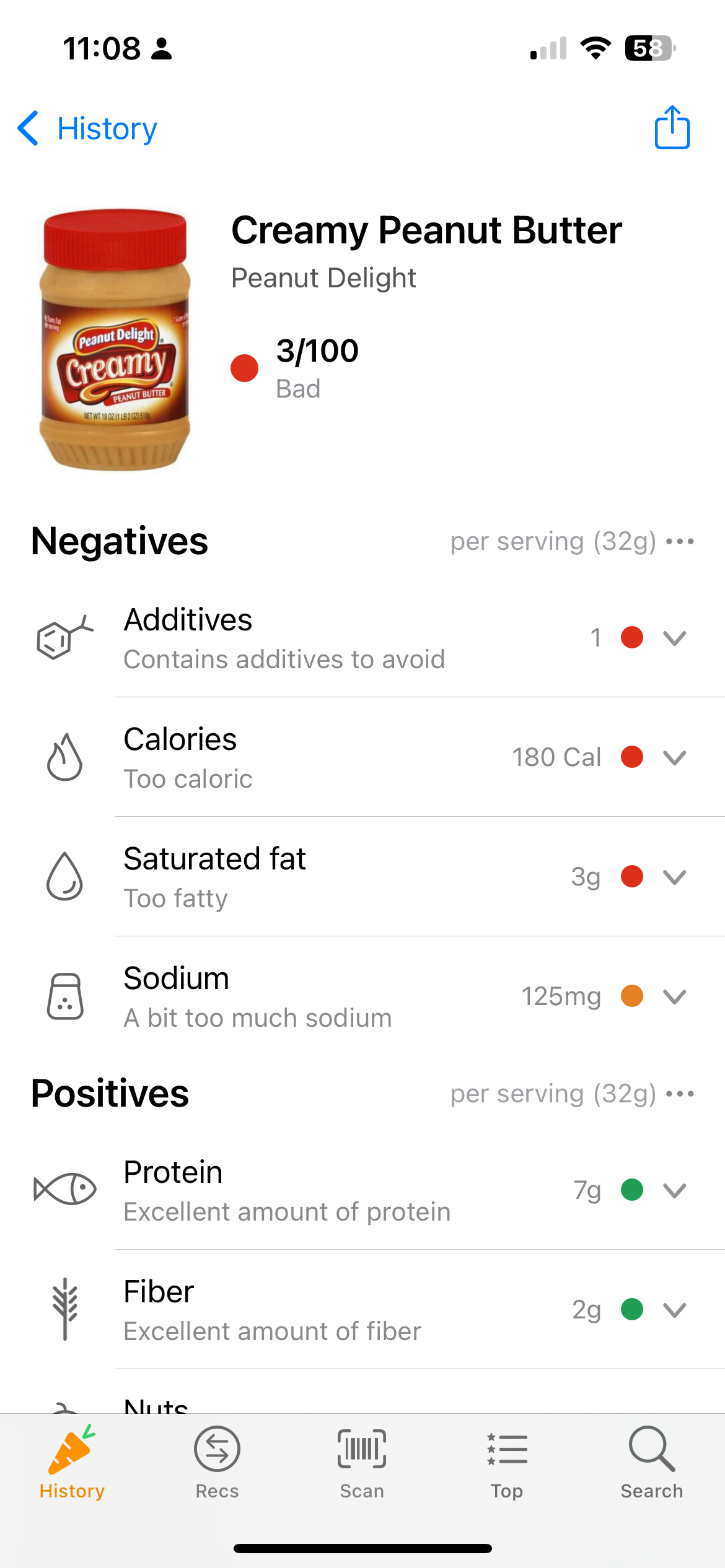
Story time: a brand of peanut butter I’d been buying received a 3 score on the app😱 There weren’t even many ingredients, but there was an additive that the app really wasn’t a fan of. I was shocked. I haven’t bought that brand since, and honestly I’m still embarrassed from that choice 😆

And that’s the thing – shame is a powerful motivator. Not in a punitive way, but in a ‘I thought I was making good choices, but now I know I can do better’ way.

Inherent gamification. There are no explicit gamification features like streaks or badges, but I feel like gamification is inherent to the product. The color-coding creates a natural goal: get more greens, avoid the reds. The recommendations feature suggests better alternatives when you scan something with a low score, which creates a clear path to ‘winning.’ I want to get better products for my family and Yuka helps with that in a way that feels like progress, not homework.

Behavior Change

The ultimate goal of any health app is behavior change, and Yuka actually achieves it for me. I always read labels, but now I’m more likely to put down an item and look for something else.

The key is that Yuka doesn’t ask you to change everything about how you shop – it just asks you to scan a barcode instead of read a label. I’m honestly pulling out my phone anyway to see how my kids are behaving at home so no real change for me. Look, I’ll still buy the thing with the red score (l’eggo my eggo, amirite?!), but my “portfolio” of purchases is definitely more green thanks to Yuka.

n00b.eth

I don’t put ‘crypto-enthusiast’ in my Twitter bio b/c it sounds cringe, but I’ve been doing a TON of crypto reading lately. My investor side thinks Bitcoin is interesting as a store of value and my tech side thinks Ethereum is fascinating as a building block for the next generation of the web – Web3.

My ‘participation’ in crypto to this point has been buying some ETH on Coinbase a couple years ago and now opening up the app everyday for fun. But a few months back I started to see a lot of folks on Twitter with .eth domains so I obviously had to get my own. And no one wants to have to append a ‘1’ to their username on a new service so that was another reason to get on it (tho my name is pretty unique).

Things move so fast that this piece feels dated as crypto-twitter has moved (back) onto NFTs and all I see are ape and punk avatars on my TL. Anyway, I learned a lot about crypto in the process of getting samgirotra.eth so I decided to document my experience here.

ENS – Ethereum Name Service

To get an .eth address you’ll need to use the ethereum name service (ENS). ENS is an open-source protocol that was spun off from the Ethereum Foundation. Similar to how domain name system (DNS) translates URLs like samgirotra.com into IP addresses so your computer can display this website, ENS translates samgirotra.eth into the ethereum/crypto addresses of your wallet (more on this later).

Use Cases

Ok – so what does this mean? What can you do with an .eth address?

For now, as far as I can tell, this allows you to receive a variety of cryptocurrencies at this single address. This is a big deal! Each cryptocurrency has its own wallet address that’s super long and not easy to remember. If you open up Coinbase, you’ll see that the address to receive Bitcoin is different from the address to receive Etherum and so on. Also, if you send crypto to a wrong address by mistake there’s no way to get it back! ENS lets you receive crypto from a single address in a much easier to remember way – with your ENS domain.

What’s In Your Wallet?

This is where the n00b part of this post comes in. ENS is an app that runs on Ethereum – a decentralized app (dApp) – and to use dApps you need a crypto wallet. I have a Coinbase account with crypto – will that work? No.

So Coinbase is a centralized exchange where one can purchase and sell crypto, but without a wallet you can’t interact with the cypto ecosystem. In my case, ENS. A wallet contains your private keys, which are the thing that represents your ownership of crypto. This is actually a feature of crypto – it’s peer to peer. So when you want to access a dApp, you do so directly and not through an intermediary.

There are lots of options for wallets, but I went with something that sounded familiar – Coinbase Wallet. You connect your source of crypto funds – in my case Coinbase – with your crypto wallet and voilà! You’re ready to start doing crypto things.

A weird thing about Coinbase Wallet is that it’s unclear how/if it’s associated with Coinbase. I’m 99.9% sure it is affiliated because the Coinbase site offers a pretty good FAQ on the differences between Coinbase and Coinbase Wallet. The thing that tripped up was that the ‘Developer’ field listed for the Coinbase Wallet app is ‘Toshi’ and not ‘Coinbase, Inc’ like the Coinbase app. Whatever, this was all for fun so I proceeded.

Registering and Paying Gas Fees

Ok now you’re ready to register your ENS name. Samgirotra.eth was available so I purchased a 3-year registration for $5 in ETH per year before gas fees. 5+ character names go for $5/year, while 4 character names go for $160/year and 3 character names for $640/year. Sam.eth is sick, but I was too cheap to pay for it.

Gas fees are paid to the cypto miners for actually creating a block of transactions added to the Ethereum blockchain. Everything is public and verifiable in crypto and it all lives in the block. I paid $5.54 in gas fees for my transaction on top of the $15 registration fee.

ENS allows you to add data beyond just your ETH address so I added my email and twitter handle for good measure. All transactions added to the Ethereum blockachain require validation and a gas fee is paid to a miner for execution. This cost another $2.22 in ETH and was a good reminder on how transacting in crypto requires actual work and thus money.

What’s Next

This whole process was fun. I’d read a lot about wallets and gas fees, but setting up samgirotra.eth provided me practical experience and the tools to do more with crypto. I still find crypto-twitter hella annoying sometimes, but it sure feels like something real is gonna come out of all this. I really like the ‘always be learning’ sentiment of this tweet (tho it’s a bit alarmist) and that’s my main reason for wanting to go deeper on crypto and Web3:

https://twitter.com/dtrinh/status/1424765355348615171?s=21

Not entirely sure what I’ll do next tho – maybe I’ll put some crypto in a decentralized exchange like Uniswap or buy an NFT on Opensea. And maybe then I’ll update my Twitter bio.

*I’ve read a lot of great essays that have taught me a ton and got me excited about the space. I’m sharing some here:

r/Community

We started a subreddit for our app earlier this year and it’s provided a ton of value for both us and our customers. There’s no lack of communication with customers; I’ve spoken to more customers at GameChanger than at any of my past product jobs. But we were looking for more organic and communal discussion. Something that wasn’t initiated by a customer support case or us wanting feedback on a specific new feature. We wanted a space where our customers could feel free to express their opinions and engage with others. So our head of CX started a subreddit.

While it’s no r/wallstreetbets, we’ve seen a lot of discussion and the signal to noise ratio of that discussion has been very high.

Here’s an overview of what we’ve seen.

The Community is self-sufficient. The bulk of the content generated on the subreddit is from the community. We posted early on to jumpstart the conversation, but now we see a steady flow of posts. Some examples:

People share how they use the product. Our product allows scoring and streaming of youth sporting events and folks have been very willing to share their respective set-ups with one another.

The community answers each other’s questions. While we do answer inquiries that people post, we see a high reply rate from the community itself. Sometimes it’s answers to straightforward questions like ‘How would you score this play?’ and sometimes it’s really going in depth about all the cameras and equipment they use to live stream a game.

It’s a great source of ideas/opportunities. Give a bunch of engaged users a forum to post thoughts and they no doubt have opinions.

People go deep on product requests. Reddit isn’t constrained by a character limit and it’s not a chat app so people have many ways in which they can express themselves. Someone made a Y/N poll on whether we should add a certain feature (Y won lol) and someone else even wrote a user story!

We found people that want to hear from us. We’re not really looking to push any features, but we love talking to people directly.

The community is so active and vocal that they’re a natural fit for beta testing new features and participating in user interviews. They provide so much value that we make a concerted effort to involve them in testing or give them ‘VIP’ customer support. For example, we’ll DM with them in Reddit for specific issues with the product.

Our product has been around for a while and we have product market fit (thanks to my colleagues, I just started) – so simply setting up a subreddit may not produce the same results we’ve seen. But I do think the combination of an already engaged audience and Reddit’s UX (posts, comments and up/down votes) has been key to the high quality discussion we’ve seen.

Check it out for yourself: https://www.reddit.com/r/GameChangerApp/

Making Time for Customer Interviews

At the start of the last quarter (Jan-Mar) I set a goal for our team to speak to 1 customer per week. Our aim was to use these interviews to generate meaningful opportunities for our product roadmap.

We had recently launched a few features that didn’t meet our expectations. We spent a lot of time making sure the features worked as intended and were technically sound, but that wasn’t enough. The results showed that we hadn’t moved the needle and we were left scratching our heads.

While reading some of Teresa Torres’ posts on Product Discovery, I realized we had fallen into a trap of focusing on solutions rather than problems. A common theme with these features was that we hadn’t validated them with customers. Maybe we saw others in our industry with similar features or we just assumed there was a clear value proposition for our customers. We didn’t intend for this – we were short on User Research help at the time and allowed ourselves to fall into bad habits. None of us had any formal training in User Research and still had our normal job-duties to manage, but we were determined to change how we were working.

By the end of the quarter we had spoken to 15 customers, came up with 2 main opportunities for product improvement, impressed our stakeholders, built compassion for our customers and learned a lot along the way. Here’s how we did it.

Finding People

One of the most challenging things for us was finding people to interview. Our products had tens of thousands of weekly users, but an email address or account wasn’t required so the vast majority of our users were ‘anonymous’ to us. One of the things we did to establish a relationship with our customers was to send a survey in our App. While the answers to the questions were useful to us, what we really wanted was the opportunity to talk to these customers. The final question in the survey asked whether the customer was willing to do an interview and, if they said yes, their email address.

Customer Service was another channel we used to find interviewees. A former User Researcher on our team had set up an email account that we used to handle customer correspondence and we used this for recruiting. I put this email in our App Store release notes and encouraged customers to contact us with questions. While the volume wasn’t huge, it was steady and those who wrote in were clearly engaged – and sometimes angry 🙁 If we successfully solved a customer’s issue we would follow up and ask if they were interested in speaking with us further.

The yield of actual interviews from customer service channels was higher than the one from completed surveys. I imagine this was the case because the customer reached out to us in the former scenario and was pre-disposed to speaking with us.

Getting the Interview

We were happy that we now had a list of customers to email, but this was just the beginning. We found that actually scheduling the interview was another challenge. Here are some of our learnings.

Meeting-scheduling software is a must! We sent out maybe 2-3 invite requests without using a scheduling tool and it was so cumbersome that we signed up for a tool right away. Typing in our available times into an email or asking customers for times that worked for them just wasn’t ideal. As we were drafting these emails my colleague turned to me and said ‘this is too hard, no one will sign up.’ She was right.

There are many of these tools on the market, but we chose Calendly. There’s a free option that syncs with the major Mail and Calendar providers and that’s all we needed to get started. This worked – we now appeared more official and customers actually booked time with us!

Incentives will help you book interviews. We weren’t able to offer gift cards for participation due to legal reasons so we had to be a bit more resourceful. We had some company swag around the office and we added a line about ‘giving you a small gift as a token of our appreciation’ to our interview requests – our bookings markedly increased when we did this. These gifts were mugs or pairs of gloves – nothing special, but customers really appreciated receiving them. So don’t worry about finding the perfect gift.

The Right Tools for the Interview

A good set-up with all the right people tools is critical for a successful interview. Here are some items that will help you get up and running with your interviews.

Have a teammate conduct the interview with you. Only one of you needs to moderate, but a teammate is great for taking notes and picking up some of the nuance you may miss as you moderate. They can also suggest follow-up questions that you may not have thought of and remind you to stop taking and just listen…as I am often guilty of 🙂

To help with transcription, we used the stock Voice Memos App on iOS to record the interviews. Just make sure to ask permission before you record.

It seems obvious, but a working phone/conference line is a must. We used our company conference lines and the customers had no problem dialing in and entering the PIN. On a few occasions we used Zoom, which always works and has a free tier.

Asking the Right Questions

The goal of our interviews was to produce generative research – we wanted to define the opportunities before pursuing the solutions. We were interested in finding out how our Product fit into our customers’ lives, why they used it and what we could do to make it better. There were three types of questions that we thought really helped us understand the customer.

1 – Questions to build Context

Open ended questions were key to learn about context. One of the specific questions that helped us was:

‘Walk us through the last time you used the App – how was the experience?” 

By asking questions like this we got the ‘Why behind the What.’

So instead of asking ‘Where and When do you watch?’ and getting something like: ‘I watch in my bedroom’…..

We got something richer: ‘I missed the episode on Live TV and wanted to catch up on my Apple TV, but my kids were watching something. I decided to go into the bedroom instead and fold clothes as I watched on my phone.

With this answer alone we learned what triggered them to watch, which device they preferred and what they did as they watched. This information is extremely valuable as we design. For example, maybe ‘multi-tasking’ becomes an opportunity we explore further and consider something like enabling audio when the App is backgrounded on mobile.

2 – Questions to Improve the Product

These are fairly straightforward, but remember to keep it open-ended.

‘What could be improved in the current App experience?” 

An important point here is not to lead. We get a lot of App Store reviews about the number of advertisements we show, but we’re not going to ask ‘Do you like Ads?’ NOBODY likes ads.

By asking a more open-ended question ‘How do you feel about the Ad experience?’ – we heard things like ‘I don’t love ads, but I understand why you have them…maybe you could show them all at the start of the video rather than throughout.’

This type of questioning also empowers customers. Instead of pushing your agenda, you are giving them the opportunity to drive the conversation. They LOVED this – so many many customers thanked us for allowing their voice to be heard!

3 – Questions to build Empathy

Asking a customer more about themselves is a great way to build empathy. One we liked to ask was:

‘Tell us a little more about yourself. What do you do for a living? Where did you grow up? Any hobbies?’

At first I felt a bit awkward asking this, but a former User Researcher colleague swore by this question and we all respected her expertise. She was right – customers loved answering this! While it may not have presented us with product opportunities, it brought us closer to our customers. We learned that one had just retired and enjoyed watching our programming to pass the time; another was working night shifts so they could save money to go to culinary school; and another had our programming on in the background while they were wood-working to relieve stress.

Getting outside of your head and learning who you are building for has an amazing motivational effect; one that’s just different than hitting OKRs or a launch date.

What’s Next

For us, this exercise was totally worth it. We prioritized potential Product opportunities with input from Interviews (and other sources) and were able to convince our leadership that we were on the right track. And personally, it was gratifying to develop a relationship with individuals that use our Products regularly.

Interviews are one of MANY inputs to the Product Development process, but one that I feel is easy to ignore. Products, especially digital ones, produce so much data that is readily available to analyze. Interviews and the information from them, on the other hand, aren’t produced automatically. It’s hard work and the process isn’t particularly scalable, especially if you don’t have someone dedicated to it.

You can get pretty far by just looking at the data and forming hypotheses around them. But, like we were, you may find yourself in a place where you find yourself just chasing after numbers without a real, human problem to solve. We found that speaking to our customers gave us direction.

I hope I’ve shown you that it is possible to do regular customer interviews, even if you don’t have much experience. And like anything else, you can and will improve with practice.

Best of luck and please reach out with any questions!

Special thanks to my colleagues Mikaela and Natalie for partnering with me on this initiative!